Subscribe this Blog

Wikipedia

Search results

Notifications and New Posts!

Friday, June 26, 2020

Simple C Quiz - Wrong Email ids have been entered by two students

Dear students of TY Mechanical A and B Division, 
please take care.

Mail Delivery Subsystem mailer-daemon@googlemail.com

12:39 PM (3 minutes ago)
to me
Error Icon

Address not found

Your message wasn't delivered to samarthschavan@coep.sveri.ac because the domain coep.sveri.ac couldn't be found. Check for typos or unnecessary spaces and try again.
The response was:

DNS Error: 6975735 DNS type 'mx' lookup of coep.sveri.ac responded with code NXDOMAIN Domain name not found: coep.sveri.ac


Mail Delivery Subsystem mailer-daemon@googlemail.com

12:39 PM (1 minute ago)
to me
Error Icon

Address not found

Your message wasn't delivered to santoshhpatil@ceop.sveri.ac.in because the domain ceop.sveri.ac.in couldn't be found. Check for typos or unnecessary spaces and try again.
The response was:

DNS Error: 6660789 DNS type 'mx' lookup of ceop.sveri.ac.in responded with code NXDOMAIN Domain name not found: ceop.sveri.ac.in

Google Meet Session - 26th June 2020 C++ TY Mechanical (A and B)

C++ TY Mech AB
Friday, 26 June13:30 – 15:30
Weekly on Friday, until 30 Sep 2020
Join with Google Meet
meet.google.com/qaj-pyzn-zmy
Join by phone

Description:Dear Student Friends,Please join sharp at 13:30 today. I will admit/allow students up to 13:40.Those who will join late for them door will be closed means entry to the session will be denied. Please note. Because admitting late, creates disturbance to all.
  1. 10 minutes before

Organiser: Mr. Sachin Bhosale

Thursday, June 25, 2020

Google Meet Session - 25 June 2020 C++ TY Mechanical (A and B)

Thursday, 25 June13:30 – 15:30
Weekly on Thursday, until 30 Sep 2020
Join with Google Meet
meet.google.com/hid-dmnv-qxw
Join by phone

Description: Dear Student Friends,Please join sharp at 13:30 today. I will admit/allow students up to 13:40.Those who will join late for them door will be closed means entry to the session will be denied. Please note. Because admitting late, creates disturbance to all.
  1. 10 minutes before

Organiser: Mr. Sachin Bhosale


Facebook

Saturday, June 20, 2020

To use rear-facing camera for Google Meet

Please join the meeting.
Please make your camera on.
                                       
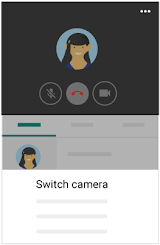
To start rear-facing camera then simply press three horizontal dots which 
are shown in the following screenshot.

Then 'Switch Camera' option will help you to switch on
your front camera to rear-facing (back) Camera.
In this way you can start 


Reverse your mobile camera for Meet

" "

You can reverse the camera on your mobile device during a video meeting.  

For example, the Meet app uses the selfie view by default, but you can reverse the camera to show the room you are in or a whiteboard.

  1. Open the Meet mobile app.
  2. Join a video call.
  3. Tap More 더보기.
  4. Tap Switch camera.
 

Switch camera


Reference: https://support.google.com/meet

With Kind Regards,

Wednesday, June 17, 2020

SVERI's COE, Pandharpur Academic Google Calendar A.Y. 2020-2021

This Google Calendar will help to add Academic Calendar of SVERI's COE Pandharpur to your own google calendar. 
Simply, Press '+ Google Calendar' ( 
Calendar
) from below calendar to add Academic Calendar into your Google Calendar App. Entire Academic calendar will be added with all events into your google calendar.

When you click on the calendar events it will give information of event.

Note : 
1. If you don't have google calendar then please download it in your android mobile from Google  Play Store.
2. Most of you will be using personal as well as official email ids, please make sure that you calendar should be added to official email id.
3. Calendar will be added either in your personal email id or official email id. Please check and after sync Academic Calendar will be appeared in your Google Calendar.

Introducing this Academic Calendar, is possible because of Prof. Dr. P.M. Pawar sir and Prof. Dr. R.N. Haridas sir. Thank you to Prof. Dr. P.M. Pawar sir for inspiring me to make digital Academic Calendar of SVERI.
Thank you to Prof. Dr. R.N. Haridas for providing the guiding excel sheet of SVERI's COE Pandharpur Academic Calendar for A.Y. 2020-2021.
😊


Tuesday, June 16, 2020

@SVERI_Civil_bot - Testing charges for construction material

प्रस्तावना
!!  सिव्हिल इंजिनिअरिंग स्ट्रक्चरल ऑडिट व टेस्टिंग सर्व्हिसेस !!
➤ बऱ्याच जुन्या इमारतींकडे विशेषतः  ३० वर्षे पूर्ण झालेल्या इमारतींकडे दुर्लक्ष करणे धोकादायक ठरू शकते. अशा इमारतींचे शास्त्रोक्त पद्धतीने अद्ययावत उपकरणाच्या साह्याने स्ट्रक्चरल ऑडिट करणे व त्यानंतर त्या इमारतींचे आयुष्यमान वाढविण्याकरिता योग्य दुरुस्ती संबंधी मागदर्शन घेणे आवश्यक असते.
➤ तसेच आपल्या बांधकाम चालू असलेल्या व पूर्ण झालेल्या कोणत्याही इमारतींचे अथवा स्ट्रक्चरचे नॉन डिस्ट्रक्टिव्ह टेस्टिंग केल्याने आपल्या बांधकामाचा दर्जा सुधारण्यास मदत होते. आमच्याकडे या करीता लागणारी खालील आंतरराष्ट्रीय दर्जाची अद्ययावत उपकरणे उपलब्ध आहेत. डिजिटल रिबाउंड हॅमर, अल्ट्रासोनिक पल्स व्हेलॉसिटी मिटर, हाफ सेल पोटेन्शल, कव्हर मिटर, क्रॉंक्रिट कोअर कटर इ. 
➤  या व्यतिरिक्त बिल्डिंग, रोड  तसेच इतर बिल्डिंग साईटच्या संदर्भातील सर्व मटेरियल टेस्टिंग या कन्सल्टन्सी सर्व्हिसेस पुरविल्या  जातील. 
➤ आत्तापर्यंत ५०० हुन अधिक खासगी, निमशासकीय व शासकीय इमारतींचे स्ट्रक्चरल ऑडिट करण्याचा अनुभव असणारे उच्चशिक्षित प्राध्यापक वर्ग.    
सूचना:- आपल्या स्वप्नवत घरकुलाचा गृहप्रवेश निश्चित होण्यासाठी जरूर आपल्या बांधकामाची मजबुती  व टिकाऊपणा टेस्ट करून घ्या. 

अधिक माहिती व टेस्टिंग सर्व्हिसेस साठी संपर्क:
सिव्हिल  विभाग,  स्वेरीज,  कॉलेज ऑफ  इंजिनिअरिंग, पंढरपुर.

प्रा. ए. बी. कोकरे                                               
(M.E. Structures)                                
(9766129169)                                       

प्रा. एम. एम. पवार                                             
(M.E. Environment)                              
(9545553888)                                  

डॉ. पी. एम. पवार
(M.Tech. IIT, Guvahati, 
Ph.D IISC Banglore) 
(9765394205)


@SVERI_Civil_bot

is Telegram bot which helps to give information of Testing charges for construction material used for Government Works for the Year 2019-20. Effective from 01/07/2019 and valid upto 30/06/2020

Bot is configured Digitally
Introducing this bot, is possible because of Prof. Dr. B.P. Ronge sir and Prof. Dr. P.M. Pawar sir and Prof. M.M. Pawar sir. 
Thank you to Prof. Dr. P.M. Pawar sir for inspiring me to configure this bot.
Thank you to Prof. A.B. Kokare sir for providing the guiding document "Testing charges for construction material used for Government Works for the Year 2019-20".
Thank you for visiting this informative bot.
🙏 😊
@sdbhosale

Saturday, June 13, 2020

13th June 2020_Google Meet Session_ATT classes of C and C++

ATT classes for C and C++
Saturday, 13 June13:30 – 15:30
Daily, until 13 Jun 2020
Join with Google Meet
meet.google.com/ryw-yutp-ire
Mr. Sachin Bhosale
Organiser
Description: (SY going to TY Students) For Electrical Engineering students For Mechanical Engineering students Please join sharp at 13:30 today. I will admit/allow students up to 13:40. Those who will join late for them door will be closed means entry to the session will be denied. Please note. Because admitting late, creates disturbance to all.
  1. 05 minutes before

Organiser: Mr. Sachin Bhosale

From last Monday i.e. 8th June 2020, we are together to 
learn C and CPP.
Today, will be our last session i.e. Session No.6.
Completing C and C++ in a week i.e. in 6 days 
that was really very difficult for me.
But I put my sincere efforts to cover most of the part.
In future, if you ask me then I will be always there for you.
Be in touch and let's learn programming to solve societal problems.

I would show my sincere gratituted towards, Prof. S. Akireddy and 
Prof. S.S. Kale sir for scheduling my session in the timetable.
Prof. D.D. Daphale, Prof. Anil Tekale and Prof. S. Akireddy  sir 
shared few electrical problems. 
Thank you to Prof. D.D. Daphale sir for clearing 
some of the doubts for electrical problems.

I would also say thank you to Head of Electrical (Prof. Dr. D. A. Tamboli Madam)
and Mechanical (Prof. Dr. S.S. Wangikar sir) because they gave me an great
opportunity to interact with all students.

Last but not the least you all who attended my session with lot of 
internet connectivity issues in this COVID-19 Pandemic situation.

In this session I learned real-life program with students. We tried to apply 
KCL (Kirchoff's Current Law).


CPP Program to understand KCL without using Class and object
/*
CPP program for KCL (Kirchoff's Current Law)
sdbhosale
Date:13/06/2020
For Mechanical and Electrical Engineering Students
*/
#include<conio.h>
#include<iostream.h>
#include<math.h>
class kcl
{
private:
int a[10],i,tnc,ic,oc,sumc;
/*
a[10] - to store current values
i     - is looping variable for for loop
tnc   - Total number of currents at node
ic    - total number of incoming currents
oc    - total number of outgoing currents
sumc  - output current
*/
public:
void inputnoc()
{
cout<<"\n Please enter total number of currents at node:";
cin>>tnc;
cout<<"\n How many are incoming currents excluding output current";
cin>>ic;
cout<<"\n How many are outgoing currents excluding output current";
cin>>oc;
}
void inputc()
{
if(tnc==(ic+oc)+1)
{
cout<<"\n Please enter values of incoming currents:";
for(i=0;i<=ic-1;i++)
{
cin>>a[i];
}
cout<<"\n Please enter values of outgoing currents:";
for(i=ic;i<=tnc-2;i++)
{
cin>>a[i];
a[i]=-a[i];
}
}
}
void displaycws()
{
cout<<"\n Currents with signs:\n";
for(i=0;i<=tnc-2;i++)
{
cout<<"\t "<<a[i]<<" A";
}
}
void calculateoc()
{
sumc=0;
for(i=0;i<=tnc-2;i++)
{
sumc=sumc+a[i];
}
if(sumc<0)
{
cout<<"\n Output current is Incoming Current!!";
}
else
{
cout<<"\n Output current is Outgoing Current!!";
}
cout<<"\n Value of Output Current="<<abs(sumc)<<" A";
}
};
void main()
{
kcl o1;
clrscr();
o1.inputnoc();
o1.inputc();
o1.displaycws();
o1.calculateoc();
getch();
}

Attendance will be updated in this post up to 15:50.
To know attendance - please Click here

Thank you.
With Kind Regards,

                                                              ATT Session is posted on facebook page:                                                                           

Google Meet Recorded Video - Click here
To watch video please rotate mobile screen and watch.